
Chatbots answer questions. A new class of software goes further: it books the meeting, files the ticket, runs the code, and checks its own work. what is an AI agent That software is the reason “agentic AI” dominates boardroom slides and engineering roadmaps this year.
So what is an AI agent, and how does it differ from the chatbot you already use? The short version is that an AI agent is software that pursues a goal on its own by perceiving its environment, deciding what to do, and taking actions through tools. The longer version matters more if you are evaluating, building, or securing one.
This guide covers the core definition, the architecture under the hood, the main agent types, real-world use cases, and the risks that most vendor pages skip. By the end, you will know where agents deliver value and where they still fail.
What Is an AI Agent? A Working Definition
An AI agent is a system that uses a model, usually a large language model (LLM), to plan and carry out multi-step tasks with limited human input. It needs an objective, not a script. The steps and their order are determined by it.
The idea is older than LLMs. Academic AI textbooks have described “intelligent agents” for decades as anything that senses an environment and acts on it. What changed is that language models now supply flexible reasoning, so agents can handle messy, open-ended tasks instead of narrow, hard-coded ones.
The Four Traits That Make Something an Agent
Not every AI feature deserves the label. A real agent shows four traits:
- Autonomy: it chooses its own next step without being told.
- It works toward a specific outcome, not just one response.
- Tool use: it calls APIs, search engines, databases, or code interpreters.
- Feedback loops: it observes results and adjusts its plan.
If a product only generates text in response to a prompt, it is an assistant. An agent takes actions and loops until the task is completed.
AI Agent vs. Chatbot vs. Traditional Automation
These three get confused constantly. The table below separates them.
| Feature | Rule-Based Automation (RPA) | AI Chatbot / Assistant | AI Agent |
| Decision logic | Fixed if-then rules | Model generates replies | Model plans and chooses actions |
| Handles unexpected input | Breaks or stops | Partially | Adapts and re-plans |
| Uses external tools | Pre-wired steps only | Rarely | Dynamically selects tools |
| Multi-step tasks | Yes, if scripted | Limited | Yes, self-directed |
| Memory of past steps | None | Short conversation | Short-term and long-term |
| Human oversight needed | Low per run | High per message | Moderate, at checkpoints |
| Typical failure mode | Brittle workflows | Confident wrong answers | Compounding errors across steps |
You should pay attention to the last row. Autonomy cuts manual work, but it also lets a small mistake snowball across many steps.
How an AI Agent Works: The Core Architecture
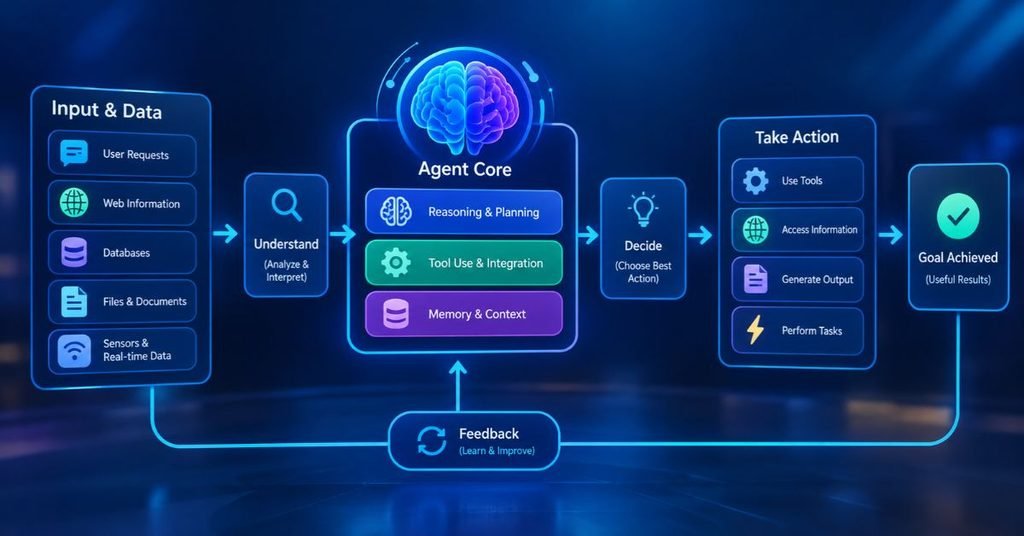
There is a common loop followed by most production agents regardless of the vendor. Understanding it makes marketing claims easier to judge.
The Perceive, Plan, Act, Observe Loop
An agent receives a goal and gathers context. It then plans a sequence of steps, executes one action, and observes the result. Based on that result, it either continues, revises the plan, or stops.
Researchers often describe this pattern as ReAct (reason plus act), where the model alternates between thinking out loud and calling a tool. A loop runs until a goal is met, the limit is reached, or a human steps in.
The Five Building Blocks
A working agent is assembled from several components:
- The reasoning model: the LLM that interprets goals and decides next steps.
- Tools: functions the agent can call, such as a web search, a SQL query, a ticketing API, or a shell command.
- Memory: short-term context for the current task and long-term storage, often a vector database, for facts and past outcomes.
- A loop is run by the orchestration layer, which manages retries and enforces step limits.
- Guardrails: permission rules, output filters, and approval gates that constrain what the agent may do.
Teams that skip the fifth block usually regret it. Demos have guardrails so you can run them safely against production systems.
Single-Agent vs. Multi-Agent Systems
One agent handles one workflow from beginning to end. A multi-agent system splits work across specialized agents, for example a researcher, a writer, and a reviewer that checks the output.
Multi-agent designs can improve quality on complex tasks. They also raise cost and make debugging harder, since you must trace decisions across several models.
Types of AI Agents
Classic AI theory sorts agents by how much reasoning they apply. These categories still help when you design or buy a system.
Simple Reflex and Model-Based Agents
Simple reflex agents react to the current input using fixed rules, like a thermostat. Model-based agents keep an internal picture of the world, so they can act sensibly even when they cannot see everything at once.
Goal-Based and Utility-Based Agents
Goal-based agents choose actions that move them toward a defined target. When goals conflict, like speed versus cost, utility-based agents score options and choose the one with the best expected outcome.
Learning Agents
Learning agents improve from experience. Modern LLM agents approximate this through feedback, stored memories, and fine-tuning, though most do not retrain themselves live in production.
Real-World Applications of AI Agents
Adoption is strongest where tasks are repetitive, digital, and measurable. Several use cases have moved past the pilot stage.
Software Engineering
Coding agents read a repository, write changes, run tests, and open pull requests. Developers still review the output, but the agent handles the tedious loop of edit, run, fail, fix.
Customer Support and IT Operations
Support agents resolve routine tickets by looking up account data and triggering refunds or password resets. In IT operations, agents triage alerts, gather logs, and propose remediation steps before an engineer joins the incident.
Research, Sales, and Finance
Research agents search multiple sources and compile cited summaries. Sales teams use agents to qualify leads and draft outreach, while finance teams use them for invoice matching and reconciliation.
The pattern is consistent. Agents perform best where a human can quickly verify the result.
Risks, Limits, and Security Considerations
Hype tends to hide the hard parts. Anyone deploying agents should plan for these.
Reliability and Compounding Errors
An agent that is 95 percent accurate per step is far less reliable across a 10-step task. Errors multiply across steps, so long autonomous chains need checkpoints and validation. Hallucinated tool calls and misread results are common failure sources.
Security Risks
Agents with real permissions create real attack surface. Prompt injection is the headline threat: malicious instructions hidden in a web page, email, or document can trick an agent into leaking data or taking unwanted actions. Excessive permissions and unlogged actions make the damage worse.
Pro-Tip / Security Note: Apply least privilege to every agent. Give it read-only access by default, require human approval for irreversible actions such as payments, deletions, and external emails, and log every tool call. Treat any text the agent reads from outside your organization as untrusted input.
Cost and Governance
Every loop iteration consumes tokens, and runaway loops can get expensive fast. Set step limits and budget caps, and assign a named owner for each deployed agent. Regulators and auditors increasingly expect traceability for automated decisions.
How to Start With AI Agents
You do not need a large program to begin. A measured approach works better than a company-wide rollout.
A Practical Starting Path
- Pick one narrow workflow that is repetitive, low risk, and easy to verify.
- Map the tools the agent needs and grant only those.
- Add human approval at the points where mistakes would be costly.
- Measure success rate, time saved, and cost per task against the manual baseline.
- Expand gradually once results hold up over several weeks.
Most failed projects skip step one and try to automate a vague, sprawling process.
Final Thoughts
What is an AI agent? It is a goal-driven system that reasons, uses tools, and acts in a loop. That definition will hold even as models improve, because the architecture of plan, act, observe, and adjust is now well established.
The next phase will focus less on raw model power and more on reliability, permissions, and interoperability between agents from different vendors. Teams that start small, keep humans in the loop for risky actions, and measure results will capture the value without the headline-making failures.
For more practical breakdowns of AI and enterprise technology, keep following Tech Sprinto.
An AI agent is software that takes a goal, figures out the steps, and uses tools to complete them with little human help. Think of it as a digital worker rather than a question-answering tool.
A chatbot like ChatGPT mainly responds to prompts with text. An AI agent can use a model like that as its brain, then add tools, memory, and a loop so it can act on its own across many steps.
They can be, with the right controls. Limit permissions, require approval for high-impact actions, log activity, and guard against prompt injection before connecting an agent to sensitive systems.
Common examples include coding agents that fix bugs and open pull requests, support agents that resolve tickets, and research agents that gather and summarize sources. Smart thermostats and robot vacuums are simpler, rule-based examples of the same concept.
Agents are better at taking over specific tasks than entire roles. Most current deployments shift people toward review, exception handling, and oversight, though some task-heavy roles will change significantly.
